
Novellair-Your Book Nook
Q- VOR PTE. LTD.Books & Reference
3.31.00K Reviews
- Version
- 2.3.6
- Installs
- 500.00K
- Age Rating
- Teen
Screenshots


Our Review of Novellair-Your Book Nook
 Analysis by Appyee
If you’re trying a new reading app for the first time, the main question is simple: can you find a story quickly, settle in, and tell whether the app suits the way you read? Novellair-Your Book Nook is a free reading app from Q- VOR PTE. LTD., built around discovering and reading stories on a phone. I’d approach it as a place to browse and sample new fiction, rather than assuming it will replace every book service or reading format you already use.
What to expect from a story-first app
The app sits in the Books & Reference category, and its focus is online reading across a range of stories. That makes it most appealing when you want something to explore in the moment: a fresh genre, an unfamiliar author, or a chapter to fill a quiet stretch of the day. It is less naturally suited to readers who mainly want a personal archive of books they already own or a tool for managing a large collection.
At first, it helps to think of browsing as part of the experience, not just a step before reading. I would go in with a loose mood—something light, tense, romantic, or mysterious—rather than expecting to arrive with a specific title and find it immediately. That approach gives a discovery-led catalog a fair chance to surprise you, while keeping the first session relaxed.
Novellair has a 3.7 average from around 3.9K ratings, with about 914 written reviews and over 500K installs. Those figures suggest that plenty of readers have tried it, but they are not a promise that every part of the experience will suit you. The app is rated Teen, so I’d still make sensible choices about what younger readers explore and check a story’s details before settling in.
Getting started without overthinking it
The app’s first step is a quick sign-up, after which you can begin exploring. I’d keep the setup simple: get through the account step, look around the available categories, and use search if you already have a particular title or author in mind. There’s no need to build a perfect reading routine before you know what kind of stories you enjoy here.
A useful first-session habit is to save a few possibilities rather than opening every promising book at once. The personalized reading list gives you a place to collect titles you want to revisit. I find that especially helpful when browsing casually: save one story for later, choose another to sample now, and avoid turning a quick search into a pile of half-started reads.
The app is free to install, but it also offers in-app purchases, with listed items ranging from $0.99 to $284.99. I’d treat any purchase as a separate decision rather than assuming that free access means every title or feature is included. If a payment prompt appears while you’re exploring, pause and check what it applies to before continuing; that makes it easier to keep your reading spend intentional.
Finding a first story worth continuing
For a first meaningful session, I’d choose one category that matches your mood, scan a few options, and open the story that sounds most inviting—not necessarily the one with the most dramatic description. Give it enough time to see whether the voice works for you. If it doesn’t, switch to another choice instead of treating the first pick as a commitment.
Once you begin reading, the customizable display can make a practical difference. Adjusting font size or background color is worth doing early, before you’ve read several screens in a setting that feels uncomfortable. Night mode is also useful for evening reading, though I’d still keep the brightness of your phone in mind; a darker page does not automatically make a screen comfortable in every room.
Bookmarks and notes support a more active way of reading. I’d use a bookmark when I want to return to a passage and a note when I have a thought that would otherwise disappear by the next chapter. That small distinction keeps saved material useful instead of leaving you with a collection of marks you can’t remember why you made.
Making reading fit into an ordinary day
Imagine you have a few spare minutes during a commute or while waiting for an appointment. Rather than scrolling through unrelated feeds, you can open a story you’ve already saved and pick up where you left off. Later, if a line stands out, add a note or bookmark it; when you have more time, browse for another title and keep it on your list. This is a modest workflow, but it gives the app a clear role without requiring a long reading session.
For readers who like to discuss what they read, the social side may add another reason to return. The app includes connections with other readers, book clubs, discussions, and author Q&A sessions. I’d treat these as optional extras: they can make a story feel less solitary, but they are not essential if you prefer to read quietly and move on.
Where it differs from familiar alternatives
Compared with a conventional ebook reader, Novellair puts more emphasis on finding stories within the app than on acting as a neutral shelf for a collection you already own. That is useful if your main problem is deciding what to read next. If you want a reader centered on importing and organizing your own books, a dedicated library app may be a better match.
It also differs from browsing recommendations on a general bookstore service: here, reading tools and discovery sit together, so you can move from looking around to opening a story without changing apps. The trade-off is that a discovery-focused experience can take patience. If you know exactly what you want and value a large, carefully managed personal catalog above all else, a more traditional ebook storefront or library-based service may feel more direct.
One practical tip is to separate “interesting” from “ready to read.” Save titles that catch your attention, then choose one when you have time to focus. Another is to test the reading display before committing to a long session; a comfortable font and background matter more over several chapters than they do during a quick sample. These simple choices make browsing feel less scattered.
Things to keep in mind before settling in
Discovery is not the same as a guarantee that every recommendation will land. A suggestion that misses your taste is a cue to try another category or search more directly, not proof that the whole catalog is a poor fit. At the same time, if you prefer to select books from a known author list or want precise control over a personal collection, the app’s story-browsing emphasis may feel less useful.
The range of in-app purchase prices is wide, so I’d be especially deliberate about spending. Decide what you are comfortable paying before tapping through a prompt, and don’t assume that a promotion or a free download means every later reading option is free as well. That careful approach is sensible for any app with optional purchases, and it helps keep casual reading from turning into an unplanned expense.
The app’s current version is 2.1.9 and it requires Android 6.0 or later. If you’re installing it on an older device, checking the operating-system requirement first can save time. For a first-time user, the simplest way to judge the experience is to try the basic path—browse, save a title, read, and adjust the display—before deciding whether the extra social features or paid options matter to you.
Settling into the reading experience
When I first launched Novellair-Your Book Nook, the app greeted me with a warm, inviting interface that made me feel right at home. The design is user-friendly, with intuitive navigation that even the least tech-savvy bookworm could appreciate. It's like stepping into your favorite bookstore, minus the coffee stain on the carpet.
Getting started is a breeze. A quick sign-up, and you’re ready to explore thousands of titles. The app offers a mix of genres, from heart-pounding mysteries to swoon-worthy romances. It’s a paradise for avid readers looking to discover new authors or revisit classics.
Browsin’ and Choosin’
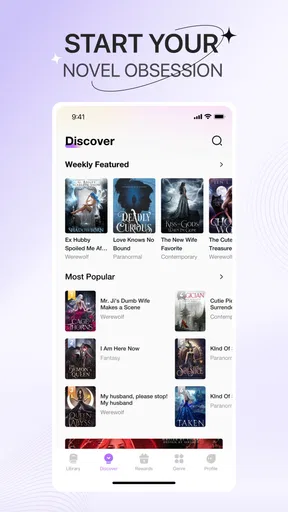
The catalog is vast, with an impressive array of books that cater to every taste imaginable. You can easily browse through categories or use the search function to find something specific. I found the recommendations to be spot-on, often introducing me to books I wouldn’t have picked up otherwise.
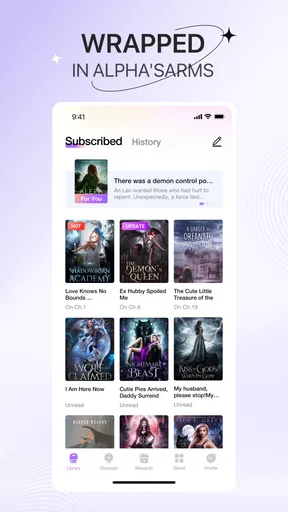
One feature I particularly enjoyed is the personalized reading list. You can bookmark titles you’re interested in and create your own little library. It’s like having a personal librarian who knows exactly what you’re in the mood for.
Reading Experience
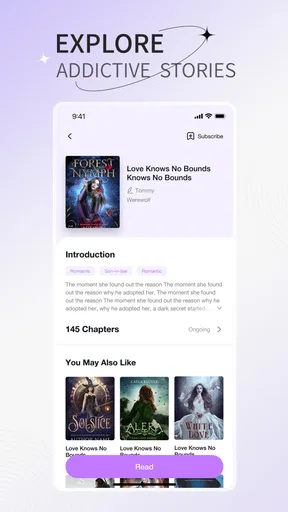
Once you’ve selected a book, you’ll find the reading experience to be seamless. The app offers customizable settings, so you can adjust the font size, background color, and even switch to night mode for those late-night reading marathons. It’s all about making sure you’re comfortable as you dive into the next chapter.
I also loved the integrated bookmarking and notes feature. You can highlight passages or jot down thoughts without losing your place. It’s perfect for those who like to engage deeply with the text.
Community Connection
One of the standout features of Novellair is its social aspect. You can connect with other readers, join book clubs, and participate in discussions. It’s like being part of a vibrant book community, sharing insights and debates over plot twists and character development.
The app also hosts author Q&A sessions, giving readers a chance to interact with their favorite writers. It’s a delightful touch that adds to the overall experience, making reading feel less solitary and more communal.
Additional Perks
Novellair doesn’t stop at just books. The app frequently updates with author interviews, book trailers, and reading challenges. These extras keep the content fresh and exciting, ensuring there's always something new to explore.
For those who love a good deal, there are often promotions and discounts available on select titles. It’s a budget-friendly way to expand your library without breaking the bank.
Things to Consider
While Novellair offers a free version, access to certain features requires a premium subscription. It’s worth considering if you’re serious about your reading, though the free version still provides plenty of value.
Another thing to note is that while the app is packed with features, it might feel a bit overwhelming at first. However, once you get the hang of it, navigating becomes second nature.
In conclusion, Novellair-Your Book Nook is a fantastic companion for any book lover looking to enrich their reading experience. Whether you're a casual reader or a literary aficionado, this app offers something for everyone. So grab your virtual library card and dive into the endless world of stories waiting for you in this delightful digital nook.
Verdict
Strengths of Novellair-Your Book Nook
- Intuitive and user-friendly interface.
- Wide range of book genres available.
- Offline reading mode supported.
- Personalized book recommendations.
- Seamless cross-device synchronization.
Limitations of Novellair-Your Book Nook
- Limited audiobook selection.
- In-app ads can be disruptive.
- Account required for full access.
- Occasional syncing issues.
- Some features locked behind paywall.
Other Releases by Q- VOR PTE. LTD.
View All
NovelBar-Your Reading Haven
Books & Reference3.5
Similar Picks in This Category
View All
Google Play Books & Audiobooks
Google LLC4.7

네이버 - NAVER
NAVER Corp.3.5

Wattpad - Read & Write Stories
Wattpad.com3.7

King James Bible - Verse+Audio
Ozion4.8

Bible Offline-KJV Holy Bible
Bíblia Offline4.9

Amazon Kindle: Reading App
Amazon Mobile LLC4.8
Frequently Asked Questions
What is Novellair and how does it work?
Novellair is a digital platform designed for book lovers to discover, read, and share novels. The app offers a vast library of genres, allowing users to explore new reads and engage with a community of like-minded individuals. With customizable reading settings and offline access, Novellair provides a tailored reading experience.
Is Novellair free to use, or does it require a subscription?
Novellair offers a freemium model, where users can access a selection of books for free. However, for full access to premium titles and ad-free browsing, a subscription is available. The subscription also includes exclusive features such as early access to new releases and personalized recommendations.
Can I read books offline on Novellair?
Yes, Novellair allows users to download books for offline reading. This feature is particularly useful for those who wish to enjoy their favorite novels without relying on an internet connection, making it perfect for travel or areas with limited connectivity.
Does Novellair support multiple devices?
Absolutely! Novellair syncs across multiple devices, ensuring your reading progress, bookmarks, and preferences are updated seamlessly. Whether you’re using a smartphone, tablet, or e-reader, you can continue your reading journey without any interruptions.
How does Novellair enhance the reading experience?
Novellair enhances the reading experience by offering customizable settings such as font size, background color, and reading mode. Additionally, users can join book clubs, participate in community discussions, and receive personalized book recommendations, making reading more interactive and enjoyable.
